
SEO Tasks Checklist: 15 Proven Daily, Weekly & Monthly Steps
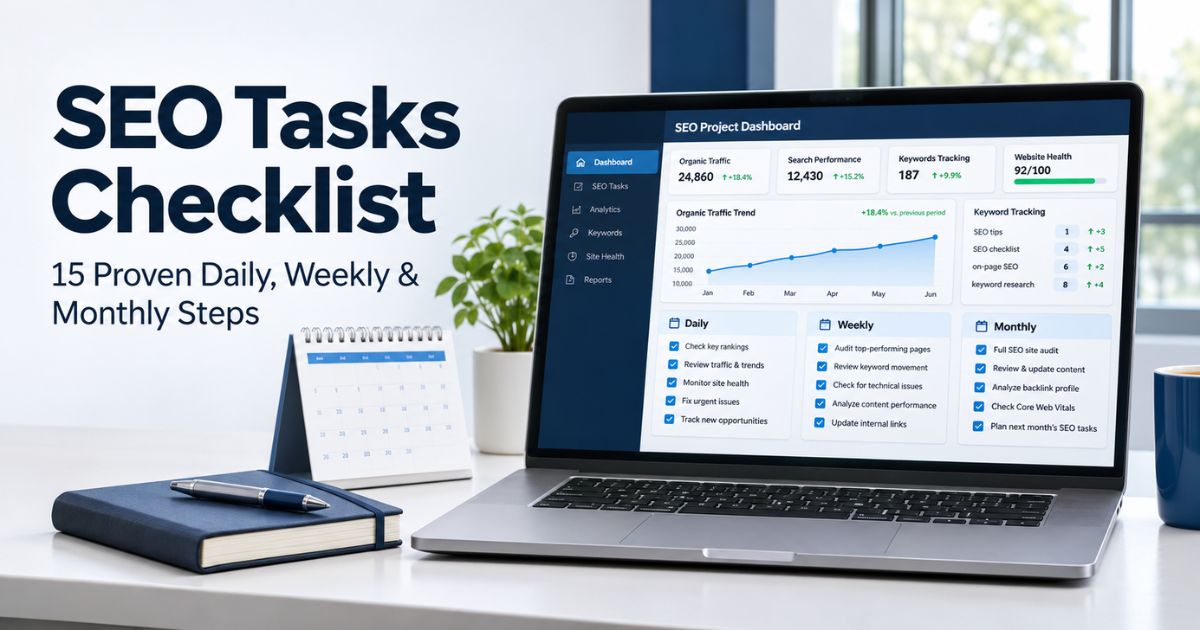
SEO tasks are easier to manage when you know what needs attention today, what deserves a weekly review, and what belongs in a monthly improvement plan. Without a routine, teams often spend too much time checking rankings and too little time fixing broken journeys, improving useful content, or measuring results.
This practical checklist organizes 15 recurring actions into daily, weekly, and monthly schedules. It is designed for website owners, content teams, and SEO professionals who want a realistic workflow rather than a long list of activities to perform every morning. For the broader strategy behind these routines, explore our guide to improving SEO.
The right frequency depends on site size and risk. A busy ecommerce store may need automated daily monitoring, while a small publishing site might review some of the same signals twice a week. Use this framework to prioritize work that supports real visitors and business goals.
Key Takeaways
- Separate urgent website checks from weekly analysis and monthly strategy work.
- Prioritize site availability, important forms, and unexpected crawl restrictions when they cause real problems.
- Use Google Search Console for Google Search performance and indexing signals; use GA4 for onsite behavior and configured key events.
- Plan content around audience needs, search intent, and measurable outcomes rather than keyword repetition.
- Review links, mobile usability, and page performance without treating every tool warning as an emergency.
- Assign an owner, due date, and expected outcome to important SEO tasks so the checklist leads to action.
Before You Begin: Set Up a Simple SEO Workflow
A recurring SEO tasks checklist works only when measurement and ownership are clear. First, verify your website in Google Search Console, implement GA4 correctly, and confirm that important actions—such as a purchase, contact-form submission, or registration—are tracked. GA4 calls important configured outcomes key events. Search Console and GA4 report different kinds of activity, so their totals should not be expected to match exactly. For measurement details, consult the official GA4 organic search report guidance.
For recurring SEO tasks, create a working sheet with five columns: task, frequency, owner, priority, and result. Add a sixth column for the supporting URL or report. Document what counts as urgent, such as a broken checkout or accidental sitewide noindex setting, versus what can wait for a planned review.
| Frequency | Main Objective | Typical Owner | Suggested Time |
|---|---|---|---|
| Daily | Catch critical problems and publishing errors | Site owner or operations | Short exception-based check |
| Weekly | Understand trends and improve priority pages | SEO or content lead | Focused review session |
| Monthly | Audit, research, prioritize, and report | SEO strategist and stakeholders | Dedicated planning session |
If you need an example of how to turn raw information into decisions, our SEO reporting framework provides a useful companion to this checklist. Keep automated alerts on for urgent failures rather than relying entirely on manual spot checks.

Daily SEO Tasks: Four Checks That Protect Your Website
Daily SEO tasks should be brief and focused on failures that require a prompt response. On a small website, automated monitoring plus an exception report may be sufficient; on a high-volume store, someone should take responsibility for investigating severe alerts.
1. Confirm Critical Pages and Customer Actions Work
Check the homepage and a small set of revenue-critical or lead-generating pages. Test important navigation, form submissions, booking flows, and checkout steps with safe test methods. An accessible page is not necessarily a functional page: a failed form can waste qualified traffic even when search rankings stay unchanged.
For urgent SEO tasks, record the affected URL, error, time discovered, and owner. If a release changed templates or menus, compare the affected paths with your expected website structure and navigation. Prioritize customer-impacting problems ahead of cosmetic adjustments.
2. Review Urgent Server, Security, and Crawl Alerts
Check hosting alerts, uptime monitoring, and any Search Console notifications for serious issues. Look for sudden 5xx responses, DNS failures, security warnings, manual actions, or unintended robots and noindex changes. Search Console information may be delayed, so it is not a real-time outage monitor.
When urgent SEO tasks reveal that several important pages have become unavailable, investigate the shared template, server, plugin, or deployment before editing individual posts. A structured technical SEO audit approach helps document the root cause and the fix rather than simply clearing an alert.
3. Quality-Check Newly Published or Updated Pages
Check the final published page on desktop and mobile. Confirm that headings are readable, images load, internal links point to the intended destinations, and visible information matches the title. Test a sample of the page’s key actions and look for broken formatting introduced by the editor.
Publishing checks are among the easiest SEO tasks to standardize. Add a consistent checklist for image alt text, canonical preference, metadata, and descriptive links. Our content mapping resource explains how to connect each new page to an existing topic instead of creating isolated posts.
4. Triage Incidents Instead of Chasing Every Fluctuation
Not every traffic dip requires immediate action. Check whether the underlying report is complete, whether the change affects one page or the whole site, and whether a release, seasonal pattern, or tracking change offers a plausible explanation.
Keep daily SEO tasks manageable with an incident log for confirmed problems and a separate observation log for trends that need more evidence. That separation keeps daily SEO tasks practical and prevents needless rewrites caused by a single day’s ranking movement.
Weekly SEO Tasks: Five Reviews for Search Performance
Weekly SEO tasks focus on patterns rather than emergencies. Compare equivalent time periods, and remember that Search Console’s freshest data can be preliminary. Segment brand and non-brand queries, countries, devices, and page groups where those distinctions are meaningful.
5. Review Search Console Clicks, Impressions, and Queries
For weekly SEO tasks, open the Google Search Console Performance report and review organic search clicks, impressions, click-through rate (CTR), and average position. Identify which queries and pages gained or lost meaningful visibility, not just the site’s overall total. A change in query mix can shift average position without representing a sitewide decline.
For official definitions of these measurements, consult Google’s Search Console metrics guidance. Then use our SEO Tools & Analytics guides to frame findings as decisions rather than a weekly screenshot collection.
6. Check GA4 Landing Pages, Engagement, and Key Events
For these SEO tasks, review organic-search sessions, important landing pages, engaged sessions, and your configured GA4 key events. For lead generation, distinguish raw form submissions from qualified inquiries where your CRM makes that possible. For ecommerce, review purchases and revenue using a clearly stated reporting and attribution method.
Google Search clicks and GA4 sessions are not identical. Tracking consent, browser behavior, channel attribution, and other measurement differences can create gaps. Useful SEO tasks ask whether your best pages generate outcomes, not only whether they attract visits. Read our SEO strategy articles for complementary planning guidance.
7. Check Priority Indexing and Crawlability Problems
For indexing-related SEO tasks, use Search Console’s Page indexing and URL Inspection reports when important URLs unexpectedly disappear from search. Review server responses, redirects, robots restrictions, canonical signals, and XML sitemap entries. Some excluded URLs are intentionally non-indexable, so do not interpret every exclusion as an error.
Compare a sample of affected URLs with the preferred versions documented in your XML sitemap guide. If pagination is involved, review our canonical pagination best practices before changing canonical tags across a series.
8. Find One Useful On-Page Content Improvement
Choose a priority URL with evidence of a gap: outdated product details, confusing answers, weak search-intent alignment, or an unusually low CTR for the relevant query mix. Compare its content with real user questions and the current search results. Update the explanation, examples, or page title only when the change makes the page more useful.
For weekly SEO tasks, one well-researched improvement can be more valuable than rewriting ten articles to satisfy a plugin score. The keywords versus SEO guide explains why a search term alone does not describe the full optimization job.

9. Inspect Internal Links and Important User Journeys
Check whether new articles link naturally to relevant parent pages and whether useful older pages link back when appropriate. Fix broken internal links or redirects found in high-value user journeys. Use descriptive anchors that explain destinations without repeating identical keyword phrases unnecessarily.
For product or service groups, review how category and detail pages connect. A shallow URL does not guarantee that a page is easy to reach. Internal linking belongs among recurring SEO tasks because site structures change as content grows. If you also work on AI shopping visibility, see our product visibility monitoring guide for a related measurement perspective.
Monthly SEO Tasks: Six Actions for Sustainable Improvement
Monthly SEO tasks are where you step away from individual alerts and assess the whole strategy. Compare performance with meaningful prior periods, consider seasonality, and prepare a realistic list of work your team can complete.
10. Refresh Keyword Research and Search Intent Mapping
For monthly SEO tasks, review Search Console queries, customer questions, sales conversations, and relevant keyword estimates. Group related searches by the intent they share rather than creating a separate page for every variation. Check which existing pages already answer the topic before commissioning new content.
Prioritize valuable gaps using likely demand, business relevance, your ability to serve the audience, and the quality of current answers. For multiple countries or languages, our international keyword research guide explains why regional terminology needs separate validation.
11. Audit and Refresh Content That Needs Attention
Choose pages using evidence: material traffic declines, obsolete facts, broken examples, confusing structure, or poor alignment with current user questions. Preserve useful content and the existing URL where possible. Update dates only when meaningful changes justify an updated timestamp.
Review page titles, headings, descriptions, images, and accessibility. A useful page should have a clear purpose and support a distinct search intent; keyword frequency alone cannot establish quality. For ideas about planning topical clusters, visit the Content SEO & Marketing section.

12. Run a Technical Crawl and Review Page Experience
Use a suitable crawler to find broken links, redirect chains, duplicate URL patterns, orphan pages, and conflicting indexability signals. Review major templates rather than treating every low-traffic URL as equally urgent. Compare crawl findings with analytics and actual customer journeys before prioritizing changes.
Use PageSpeed Insights and available field data to review Core Web Vitals—Largest Contentful Paint (LCP), Interaction to Next Paint (INP), and Cumulative Layout Shift (CLS). Check mobile and desktop experiences and investigate real issues such as oversized images, disruptive scripts, or shifting layouts.
Technical SEO tasks should produce an actionable list with impact, owner, and expected effort. The Technical SEO resource library contains supporting guides for crawling and site health.
13. Review Backlinks, Editorial Mentions, and Local Details
For these SEO tasks, assess newly discovered relevant links, referral traffic, and noteworthy mentions without treating backlink totals as a stand-alone measure of quality. Do not disavow normal or unfamiliar links automatically; investigate evidence of harmful link schemes or manual-action risks first.
Use our enterprise link-building guide for editorial outreach principles, the disavow decision guide for high-risk situations, and the nofollow link explanation for relationship attributes.
If you serve customers locally, also check business hours, contact details, location-specific landing pages, and genuine customer questions. Our location page guide covers maintaining useful geographically relevant information.

14. Prepare a Monthly Performance and Business Report
Summarize the past month’s clicks, impressions, important landing-page trends, organic sessions, qualified leads, purchases, and major technical issues. Use consistent date ranges and note any tracking changes or significant deployments. Explain which changes are observations and which have enough evidence to justify action.
Separate outcomes from diagnostic signals. More impressions do not necessarily mean more sales, and a temporary ranking change does not prove a successful campaign. A clear explanation of uncertainty helps stakeholders make informed choices.
Among monthly SEO tasks, reporting is most useful when every meaningful finding has a proposed next step. For significant changes around confirmed Google rollouts, consult the Google algorithm update tracker rather than assuming every fluctuation was caused by an update.
15. Prioritize Next Month’s Roadmap and Assign Owners
To close your monthly SEO tasks, rank proposed fixes by customer impact, affected page importance, risk, and implementation effort. Select a realistic mix of technical maintenance, content improvement, keyword opportunities, and conversion support. Give each item an owner, deadline, and metric that could show whether the change was useful.
Keep a record of completed work and evaluate it over time. A redesign, migration, or important Google update may justify a more detailed review; a routine month should not turn into a complete site overhaul without evidence. Our core update analysis guide provides a framework for investigating ranking changes carefully.
When AI-powered search is a meaningful part of your audience’s journey, consider whether the existing content is clear and accessible rather than chasing unsupported tactics. The LLMO checklist provides a relevant supporting workflow.
Daily, Weekly, and Monthly SEO Tasks at a Glance
| Schedule | Tasks | Useful Evidence |
|---|---|---|
| Daily | Critical journeys, urgent alerts, publishing QA, incident triage | Uptime alerts, test results, incident log |
| Weekly | Search performance, GA4 outcomes, indexing, page improvements, internal links | Search Console, GA4, crawl samples |
| Monthly | Keyword research, content refreshes, technical audit, link review, reporting, roadmap | Audit exports, conversion data, priorities |
Daily SEO tasks are primarily protective; weekly reviews are diagnostic; monthly work should improve your strategy. Smaller sites can combine reviews, while high-risk websites may need more frequent checks or automated monitoring.
Common SEO Checklist Mistakes to Avoid
- Overreacting to daily ranking changes: Confirm data quality and patterns before rewriting a page.
- Using too many focus keywords: Generic words can distort plugin density scores and encourage unnatural writing.
- Ignoring conversion outcomes: More traffic is not automatically more business value.
- Confusing Search Console with GA4: Their reports measure different events and cannot always reconcile.
- Updating every post on a calendar: Refresh content when facts, intent, or usefulness require it.
- Fixing every crawl warning: Focus first on real errors affecting valuable pages.
- Changing indexed URLs without planning: Preserve stable addresses where possible and use appropriate redirects for necessary moves.
- Adding links just to reach a count: Links should serve the reader and point to relevant destinations.
Frequently Asked Questions
What SEO tasks should I do every day?
Focus on critical-site availability, important forms or checkout flows, urgent alerts, and quality checks after publishing. Many small sites can automate these checks and review exceptions rather than manually inspecting everything daily.
Which SEO tasks should I review weekly?
Review Google Search Console trends, GA4 landing pages and key events, priority indexing concerns, one or two content opportunities, and important internal links. Compare meaningful time periods instead of one day’s movement.
What belongs on a monthly SEO checklist?
Monthly work generally includes keyword research, content audits, technical crawling, performance reviews, relevant backlink checks, and planning with clear owners and priorities. Adjust frequency to the size and complexity of your site.
Do SEO tasks guarantee higher rankings?
No. A consistent routine helps identify problems, improve content, and measure outcomes, but rankings depend on many factors outside your control. Judge the work through useful changes and long-term performance.
Should I use Google Analytics or Search Console for SEO?
Use both for different purposes. Search Console reports how your site appears and receives clicks in Google Search; GA4 records activity on the website and configured key events. Understand the different definitions before comparing totals.
How many keywords should I track in Rank Math?
Choose one clear primary focus keyword for each article and use truly relevant supporting phrases naturally. Adding dozens of generic words as focus keywords can produce misleading density warnings and does not improve content quality.
How do I prioritize a long task list?
Start with urgent failures affecting customers or important indexable pages. Next, address recurring content, navigation, or conversion problems. Keep lower-impact improvements in a dated roadmap rather than trying to complete everything at once.
Conclusion
A reliable SEO tasks checklist keeps website maintenance manageable. Daily checks protect important journeys, weekly analysis identifies practical improvements, and monthly planning connects technical work and content quality to business goals.
Use a short, repeatable schedule, document what you learn, and prioritize work supported by evidence rather than chasing every tool warning. Over time, consistent SEO tasks can make your website easier to maintain, easier to use, and better prepared for sustainable organic growth. Browse the Online SEO Blogs article library for related guides.