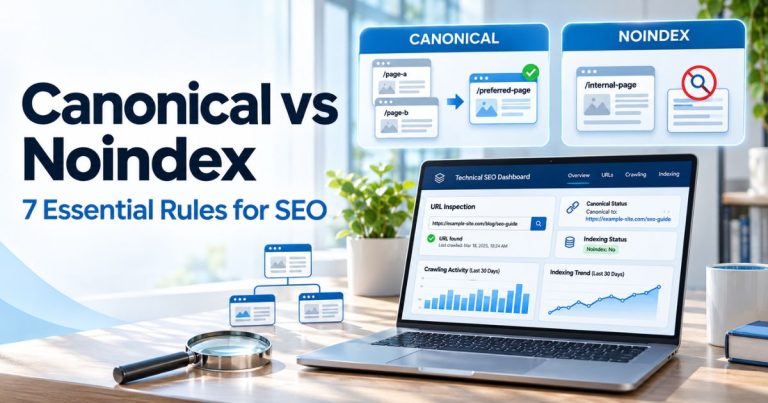
Canonical Pagination: 9 Essential Best Practices for Better SEO

Canonical pagination is the correct handling of canonical URLs across a multi-page sequence such as category pages, product listings, blog archives, reviews, or other collections. For Google, each meaningful paginated page should normally have its own unique URL and its own canonical URL rather than canonicalizing every page in the sequence back to Page 1.
A strong canonical pagination setup also uses crawlable HTML links between pages, avoids fragment-based page numbers, keeps filter and sorting URLs under control, and gives infinite-scroll content persistent URLs that search engines can access independently.
Key Takeaways
?page=2 and ?page=3 as separate pages.<a href> links rather than relying only on buttons or JavaScript actions.What Is Canonical Pagination?
Canonical pagination describes how canonical tags should work when one collection is divided across several URLs.
Common examples include:
- Ecommerce category pages
- Blog archives
- News archives
- Product reviews
- Forum threads
- Comment pages
- Search or listing pages
- Large directories
Suppose a category contains 120 products and displays 24 products per page. The sequence might look like this:
https://example.com/shoes/
https://example.com/shoes/?page=2
https://example.com/shoes/?page=3
https://example.com/shoes/?page=4
https://example.com/shoes/?page=5
These URLs belong to the same collection, but they do not show identical subsets of products. Google therefore recommends treating the pages as separate URLs rather than telling Google that Pages 2–5 are duplicates of Page 1.
Google’s current pagination documentation specifically says not to use the first page of a paginated sequence as the canonical for every other page.
This is the central rule behind canonical pagination.
For broader crawling, indexing, architecture, sitemap, and canonical checks, use our technical SEO audit guide and Technical SEO resource hub.
Why Canonical Pagination Matters
Incorrect canonical pagination can make it harder for search engines to understand deeper collection pages and discover the items linked from them.
Common problems include:
- Pages 2, 3, and 4 all canonicalized to Page 1
- Pagination available only through JavaScript buttons
- Page numbers stored in URL fragments
- Filtered and sorted URLs mixed with normal pagination
- Infinite-scroll content without persistent URLs
- Pagination links marked nofollow unnecessarily
- Conflicting canonicals, sitemap URLs, and internal links
Google’s broader canonicalization guidance explains that a canonical is Google’s selected representative URL from a group of duplicate or highly similar pages. Your canonical annotation is an important signal, but Google can still select a different canonical when other signals disagree.
That is why canonical pagination should be implemented consistently across canonical tags, internal links, URLs, sitemaps, redirects, and crawl controls.
For wider SEO fundamentals, see our 12 practical SEO strategies and the main SEO hub.

9 Essential Canonical Pagination Best Practices
1. Give Every Paginated Page a Unique URL
The first canonical pagination requirement is simple: every page that exposes a different part of the collection needs a persistent URL.
Google gives an example using a page parameter:
https://example.com/category?page=1
https://example.com/category?page=2
https://example.com/category?page=3
A path-based structure can also work:
https://example.com/category/page/2/
https://example.com/category/page/3/
The exact format matters less than consistency and crawlability.
Do not use fragments such as:
https://example.com/category#page=2Google’s current URL structure guidance says Google generally does not support URL fragments for changing page content.
Good canonical pagination therefore starts with URLs that can be requested independently by a crawler and shared directly by a user.
2. Use a Self-Referencing Canonical on Each Paginated Page
Each meaningful page in a normal canonical pagination sequence should normally point its canonical tag to itself.
Page 1:
<link rel="canonical" href="https://example.com/category/">Page 2:
<link rel="canonical" href="https://example.com/category/?page=2">Page 3:
<link rel="canonical" href="https://example.com/category/?page=3">Google’s general canonical documentation also recommends self-referencing canonical annotations on canonical pages.
See Google’s canonical URL implementation guide for the wider rules around canonical signals.
Do not assume that the first page is automatically the only page worth indexing. Later pagination URLs may expose products, articles, or resources that are not linked directly from Page 1.
If you are reviewing an existing site for conflicting canonical tags, include this check in the technical SEO audit process.
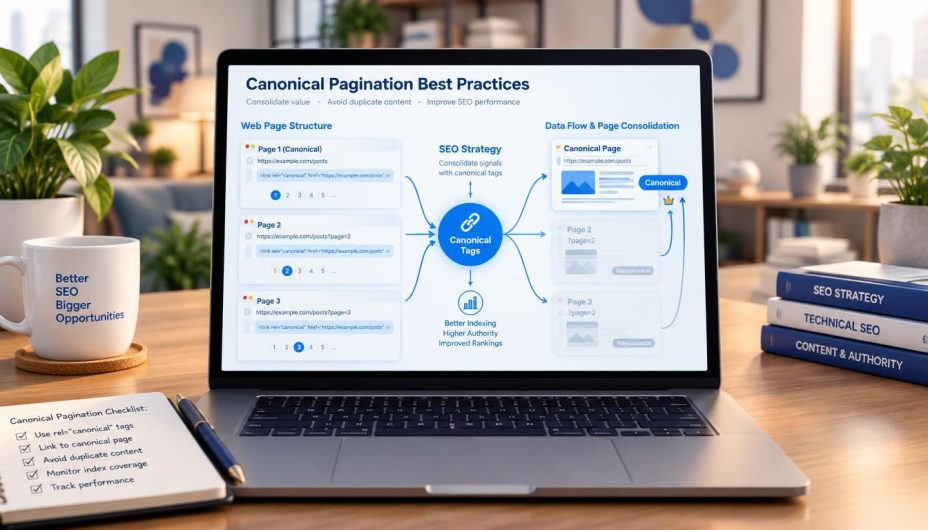
3. Do Not Canonicalize Pages 2, 3, and Beyond to Page 1
This is one of the most important canonical pagination mistakes to avoid.
Do not automatically configure:
Page 2 → canonical to Page 1
Page 3 → canonical to Page 1
Page 4 → canonical to Page 1
Google’s pagination documentation explicitly recommends against using Page 1 as the canonical for the entire sequence.
Why?
Page 2 normally contains items that Page 1 does not contain. The same applies to later pages. Telling Google that all of those URLs are duplicates of Page 1 creates a misleading canonical signal.
A better canonical pagination model is:
Page 1 → Page 1
Page 2 → Page 2
Page 3 → Page 3
Page 4 → Page 4
This does not mean every pagination URL must rank independently for the same query. Canonicalization and ranking are different questions.
Canonical tags primarily help Google understand representative URLs and duplicates; they are not a tool for forcing a particular URL to rank.
Our SERP volatility guide provides broader context on why search visibility can change for many reasons beyond canonical tags.
4. Link Paginated Pages With Crawlable HTML Anchors
Good canonical pagination also requires Google to discover the pages in the sequence.
Use links such as:
<a href="/category/?page=2">Next</a>or numbered links:
<a href="/category/?page=2">2</a>
<a href="/category/?page=3">3</a>
Google says its crawlers generally discover URLs from the href attribute of normal anchor elements. Crawlers generally do not click buttons or trigger JavaScript interactions that require user actions.
This matters for:
- Next/previous controls
- Page-number links
- Load-more interfaces
- Infinite-scroll systems
- Product grids
- Blog archives
Google also suggests considering links from individual sequence pages back to the first page. This can reinforce Page 1 as an important starting point without incorrectly canonicalizing the whole collection to it.
For broader internal-link architecture, see our SEO improvement guide and the Content SEO & Marketing hub.
5. Keep Pagination Links Followable
A canonical pagination sequence normally needs ordinary crawlable links between its pages.
Do not automatically add rel="nofollow" to pagination controls such as Next, Previous, Page 2, or Page 3.
If the deeper pages contain products, articles, reviews, or other content that Google should be able to discover, blocking or discouraging those navigation paths works against the purpose of the pagination structure.
This is different from using nofollow for an untrusted, sponsored, or otherwise specially qualified outbound relationship.
For a detailed explanation of that distinction, see our nofollow links guide and the Off-Page SEO & Link Building hub.
The important canonical pagination rule is simple: normal pagination navigation should function as normal site navigation.

6. Do Not Rely on rel=”next” and rel=”prev” for Google
Older canonical pagination tutorials often recommend:
<link rel="next" href="https://example.com/category?page=3">
<link rel="prev" href="https://example.com/category?page=1">
Google no longer uses these annotations as pagination signals.
Its current documentation states that rel="next" and rel="prev" were used in the past but are no longer used by Google, although another search engine may still choose to use them.
Do not spend your main technical effort maintaining these tags for Google.
Instead, prioritize:
- Unique page URLs
- Self-referencing canonicals
- Crawlable anchor links
- Accessible content
- Consistent internal URLs
- Correct filter handling
This is a good example of why older SEO documentation needs periodic review. Our editorial policy explains why Online SEO Blogs prioritizes current primary-source documentation when technical guidance changes.
7. Separate Pagination From Filters and Sorting URLs
Pagination URLs and faceted navigation URLs are not the same thing.
A normal canonical pagination URL may be:
/shoes/?page=3A filtered version might be:
/shoes/?color=black&size=10&sort=priceFilters can create thousands or even millions of combinations on a large ecommerce site.
Google’s current faceted navigation guidance warns that these large URL spaces can consume crawler resources and slow discovery of useful pages.
Your strategy depends on whether those filtered URLs provide independent search value.
| URL Type | Typical Approach |
|---|---|
| Normal pagination | Unique URL, crawlable links, own canonical |
| Useful indexable filter | Allow crawling/indexing and give it consistent canonical signals |
| Unimportant filter combination | Control crawling or indexing intentionally |
| Sort-only variation | Usually avoid treating every order as an independent search landing page |
| Empty result combination | Return an appropriate no-result response, often 404 when the URL has no valid content |
Do not blindly apply noindex, robots.txt, and canonical tags together without understanding how they interact.
Google must crawl a page to see its noindex directive. Its noindex documentation warns that if robots.txt blocks the page, Google cannot read the noindex rule.
This is exactly the kind of issue that belongs in a comprehensive technical SEO review.
8. Make Infinite Scroll and Load More Crawlable
Modern websites often replace visible numbered pagination with infinite scroll or Load More buttons. The user experience can still work, but canonical pagination principles remain relevant behind the interface.
Google’s infinite-scroll guidance recommends supporting paginated loading with persistent URLs for each content chunk.
For example:
/articles/?page=1
/articles/?page=2
/articles/?page=3
Each URL should:
- Load independently
- Return the same expected content when revisited
- Have a stable URL
- Be reachable through crawlable links
- Use appropriate canonical signals
A user can still experience a continuous scroll interface while crawlers have a reliable paginated URL structure behind it.
This is a strong canonical pagination approach because usability and crawlability do not have to be mutually exclusive.
For JavaScript, rendering, crawlability, and architecture issues, continue with our technical audit guide.

9. Audit Canonical Pagination With Search Console and a Crawler
The final canonical pagination best practice is testing what your implementation actually produces.
Check several URLs across the sequence rather than testing only Page 1.
For Page 1, Page 2, Page 5, and a deep page, verify:
- HTTP status is correct
- URL is crawlable
- Robots meta directive is intentional
- Canonical points to the expected URL
- Google-selected canonical is reasonable
- Next pages are linked with
<a href> - Products or articles are accessible
- No unexpected redirect occurs
- Filter parameters are controlled
- JavaScript does not change the canonical incorrectly
Google updated its canonical troubleshooting guidance in 2026 and notes that even after fixes, canonical clusters may take time to be reevaluated.
Use the URL Inspection tool to compare the user-declared canonical with Google’s selected canonical when diagnosing a canonical pagination problem.
For ongoing technical measurement, use our SEO Tools & Analytics hub.
If organic visibility changed around the same time as a technical deployment, compare the timeline with our SERP volatility guide before assuming the canonical change alone caused the movement.
Canonical Pagination Example for an Ecommerce Category
Consider an ecommerce category with three pages.
Page 1
URL:
https://example.com/laptops/

Canonical:
<link rel="canonical" href="https://example.com/laptops/">

Pagination:
<a href="/laptops/?page=2">Next</a>
Page 2
URL:
https://example.com/laptops/?page=2

Canonical:
<link rel="canonical" href="https://example.com/laptops/?page=2">

Pagination:
<a href="/laptops/">1</a>
<a href="/laptops/?page=3">3</a>
Page 3
URL:
https://example.com/laptops/?page=3

Canonical:
<link rel="canonical" href="https://example.com/laptops/?page=3">

Pagination:
<a href="/laptops/">1</a>
<a href="/laptops/?page=2">2</a>
This canonical pagination structure keeps every page independently accessible while preserving a clear relationship between the pages.
Google also recommends consistency for Page 1 when a platform supports both:
/laptops/
and
/laptops/?page=1
Choose one form for internal links and canonical signals rather than switching between both versions unpredictably.
Should Paginated Pages Have Unique Titles and Meta Descriptions?
This is an area where older canonical pagination advice often becomes more complicated than Google’s current guidance.
Normally, Google recommends distinct page titles. However, its current pagination documentation says pages in a paginated sequence do not have to follow that recommendation and may use the same titles and descriptions because Google attempts to recognize that the pages belong to one sequence.
You can still use useful labels such as:
Running Shoes - Page 2
Running Shoes - Page 3
if they improve usability or administration.
But you do not need to spend hours creating artificial keyword variations for every page solely for SEO.
For wider title, heading, keyword, and on-page strategy, use our keywords versus SEO guide and SEO optimization guide.
Canonical Pagination vs. Duplicate Content
Pagination does not automatically mean harmful duplicate content.
In a correct canonical pagination sequence, each page usually contains a different subset of items even though navigation, headings, category copy, and templates may overlap.
Google’s canonicalization documentation says duplicate content on a website is normal and is not automatically a spam-policy violation.
The real issue is whether multiple URLs expose substantially the same primary content and whether your technical signals make the preferred version unclear.
Examples that may require separate canonical handling include:
- Tracking-parameter duplicates
- Print versions
- HTTP/HTTPS duplicates
- www/non-www duplicates
- Sort-order variants
- Duplicate filter combinations
Do not apply the solution for those duplicate URLs blindly to normal canonical pagination pages.
Canonical Pagination and XML Sitemaps
XML sitemaps and canonical pagination should send consistent signals.
Google describes sitemap inclusion as a weaker canonicalization signal than redirects or rel="canonical", but consistency still matters.
If a page is intended to be canonical and indexable, avoid creating obvious conflicts such as:
- Canonical points to URL A
- Sitemap lists URL B
- Internal links point mostly to URL C
Google can resolve conflicting signals, but your implementation should make the intended architecture as clear as possible.
Our technical audit template includes site-architecture, crawlability, sitemap, and indexing checks that complement a canonical pagination audit.
Canonical Pagination and AI Search
Canonical pagination remains a traditional technical SEO issue even as AI-powered search becomes more common.
AI search does not eliminate the need for:
- Crawlable URLs
- Consistent canonical signals
- Logical internal links
- Accessible content
- Clear site architecture
If products, articles, or supporting resources are difficult for crawlers to discover because deeper pagination pages are inaccessible, that problem affects the underlying search foundation before any AI-specific optimization is considered.
Our foundational SEO for AI guide, LLMO checklist, and AI Search & SEO hub explain how technical SEO remains part of modern search visibility.
Common Canonical Pagination Mistakes
Canonicalizing every page to Page 1
This is the classic canonical pagination mistake. Each standard paginated page should normally have its own canonical URL.
Using fragments for page numbers
Avoid structures such as #page=3. Google generally ignores URL fragments when crawling page variations.
Using buttons without crawlable URLs
Google crawlers generally do not click Load More buttons. Provide discoverable URLs and anchor links.
Relying on rel=”next” and rel=”prev”
Google no longer uses these tags as pagination signals.
Nofollowing pagination links
If deeper pages should be discovered, normal pagination links should normally remain crawlable.
Blocking a page before Google can read noindex
A robots.txt block prevents Google from crawling the page and seeing the noindex directive.
Using canonical as a substitute for crawl management
Canonicalization and crawl control solve different problems. Large faceted-navigation spaces may require separate crawl-management decisions.
Changing established URLs without a reason
Do not redesign a live pagination URL structure merely because a different slug or parameter looks cleaner.
Our Google core update guide also recommends avoiding unnecessary URL changes when diagnosing visibility problems.
Canonical Pagination Technical Checklist
- Give every pagination page a persistent unique URL.
- Use one consistent Page 1 URL format.
- Do not use URL fragments for page numbers.
- Add a self-referencing canonical to each normal pagination page.
- Do not canonicalize the complete sequence to Page 1 by default.
- Use crawlable
<a href>links between pages. - Ensure deeper pages can load independently.
- Do not rely on buttons alone for discovery.
- Do not rely on
rel="next"orrel="prev"for Google. - Keep normal pagination navigation followable.
- Separate pagination parameters from filter and sorting parameters.
- Decide intentionally which faceted URLs should be crawlable.
- Remember that Google must crawl a page to see a noindex rule.
- Give infinite-scroll chunks persistent URLs.
- Make sure JavaScript does not inject conflicting canonical URLs.
- Check server-rendered HTML where possible.
- Keep sitemap, internal-link, redirect, and canonical signals consistent.
- Use Search Console URL Inspection to review canonical selection.
- Test deep pagination pages with an SEO crawler.
- Monitor indexing and crawl patterns after major changes.
This checklist keeps canonical pagination focused on discoverability and consistency rather than outdated pagination tricks.
If a technical change coincides with ranking movement, compare Search Console data and check our Google Algorithm Update Tracker and Google Search Updates hub before assuming the deployment is the only cause.
Frequently Asked Questions
What is canonical pagination?
Canonical pagination is the implementation of canonical URLs across a multi-page sequence. In a normal sequence, each meaningful paginated URL should generally have its own URL and self-referencing canonical rather than pointing every page to Page 1.
Should Page 2 canonicalize to Page 1?
No, not by default. Google’s current pagination guidance says not to use the first page of a paginated sequence as the canonical for all later pages. Give each normal page its own canonical URL.
Does Google still use rel=”next” and rel=”prev”?
No. Google states that it no longer uses rel="next" and rel="prev" to identify pagination relationships, although other search engines may still use them.
Should pagination links use nofollow?
Usually no. If Google needs to discover deeper pages in the sequence, pagination navigation should use normal crawlable links. Nofollow is not a substitute for proper pagination architecture.
Can I use infinite scroll instead of numbered pagination?
Yes, but support it with persistent paginated URLs that can be loaded independently. Google recommends giving each content chunk a stable URL so crawlers can access content that would otherwise depend on scrolling or user interaction.
Should paginated pages be noindex?
Not automatically. Later pages may be important discovery paths to products, articles, or other resources. Decide indexing intentionally based on the site’s architecture rather than applying noindex to all pagination pages by default.
Can all paginated pages use the same title?
Google’s current pagination documentation says pages in a paginated sequence may use the same titles and descriptions because Google attempts to recognize the sequence. You can still differentiate them when doing so improves usability or management.
Are filters the same as pagination?
No. Pagination divides one collection into multiple pages. Filters and sorting create alternate views or subsets and can generate very large URL spaces, so they often require separate crawling, indexing, and canonicalization decisions.
How can I test canonical pagination?
Inspect several pages in the sequence with an SEO crawler and Google Search Console. Check status codes, crawlability, canonical tags, Google-selected canonicals, internal links, URL parameters, robots directives, and whether deeper content can be reached independently.
Conclusion
Canonical pagination works best when every meaningful page in a sequence has a clear identity. Give each page a unique persistent URL, use a self-referencing canonical, connect pages with crawlable HTML links, and do not canonicalize the entire sequence to Page 1.
Strong canonical pagination also means separating normal page numbers from faceted-navigation URLs, ensuring infinite-scroll content has crawlable paginated fallbacks, and avoiding outdated reliance on rel="next" and rel="prev".
Most importantly, treat canonical pagination as part of a wider technical architecture. Canonicals, internal links, robots directives, JavaScript, sitemaps, filters, indexing rules, and URL structures should reinforce one another rather than send conflicting signals.
Continue with our Technical SEO hub, technical SEO audit guide, SEO improvement guide, SEO Tools & Analytics resources, SERP volatility guide, SEO with AI foundations, LLMO checklist, and the full Online SEO Blogs library for related guidance.